Google’s AI is Now Answering Questions About Your Business (And You Don’t Have Control)

If you manage a Google Business Profile, here’s something critical about Google Business Profile optimization: Your listing is no longer just a static directory entry. Instead, Google’s AI is now actively answering questions about your business using information from your profile, website, and reviews—whether you’re ready or not.
And the scary part? Most business owners have no idea this change happened. In fact, they don’t know what it means for their Google Business Profile optimization strategy.
Here’s the situation: In December 2025, Google removed the Questions & Answers section from business profiles. Instead, they introduced something called “Ask Maps”—an AI-powered feature that automatically answers customer questions about your business.
Sounds convenient, right?
However, there’s one problem: The AI is answering for you, whether you’re ready or not.
What Actually Happened to Google Business Profiles?

For years, your Google Business Profile had a Q&A section where customers could ask questions. Then, you (or other customers) could answer them. It wasn’t perfect, but at least you had some control over the conversation.
That’s gone now.
Starting November 3, 2025, Google officially stopped the Q&A feature. Subsequently, by December 2025, it started disappearing from most business listings.
Instead, when someone searches for your business on Google Maps, they now see a box that says “Ask about this place.” Therefore, they can type any question they want, and Google’s AI (called Gemini) instantly generates an answer.
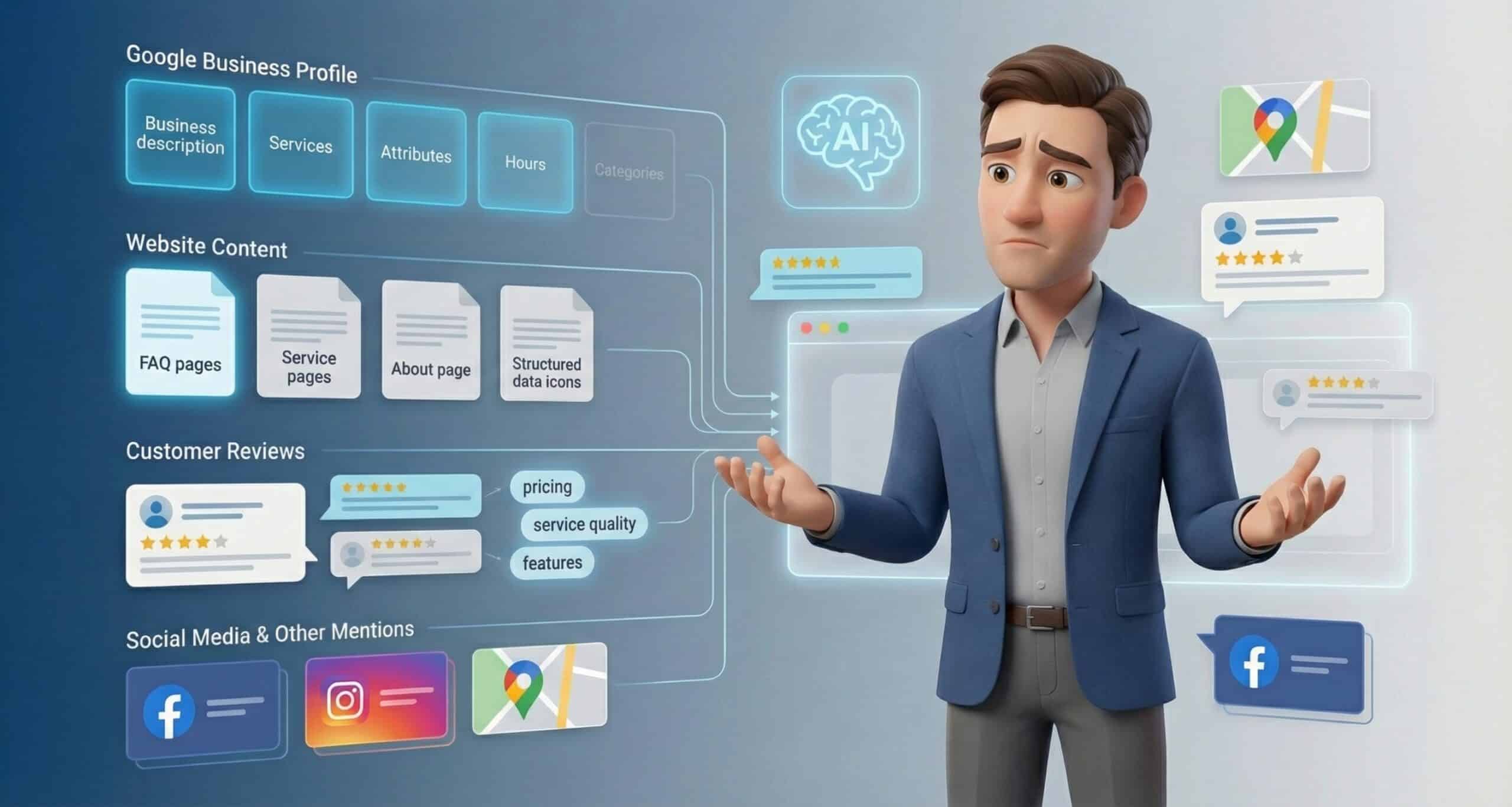
Here’s where it gets interesting: The AI pulls answers from multiple sources:
- Your Google Business Profile details
- Your website content
- Customer reviews
- Your social media accounts
- Other websites mentioning your business
The AI reads all of this and decides what to tell potential customers about your business.
Why This Matters More Than You Think
You’re running a business, and you’ve got a million things on your plate. So why should you care about another Google update?
Because this changes everything about how customers discover and evaluate your business online.
Think about it this way: Before, someone would look at your profile and read a few reviews. Then, maybe they’d check out your website. They were doing the research.
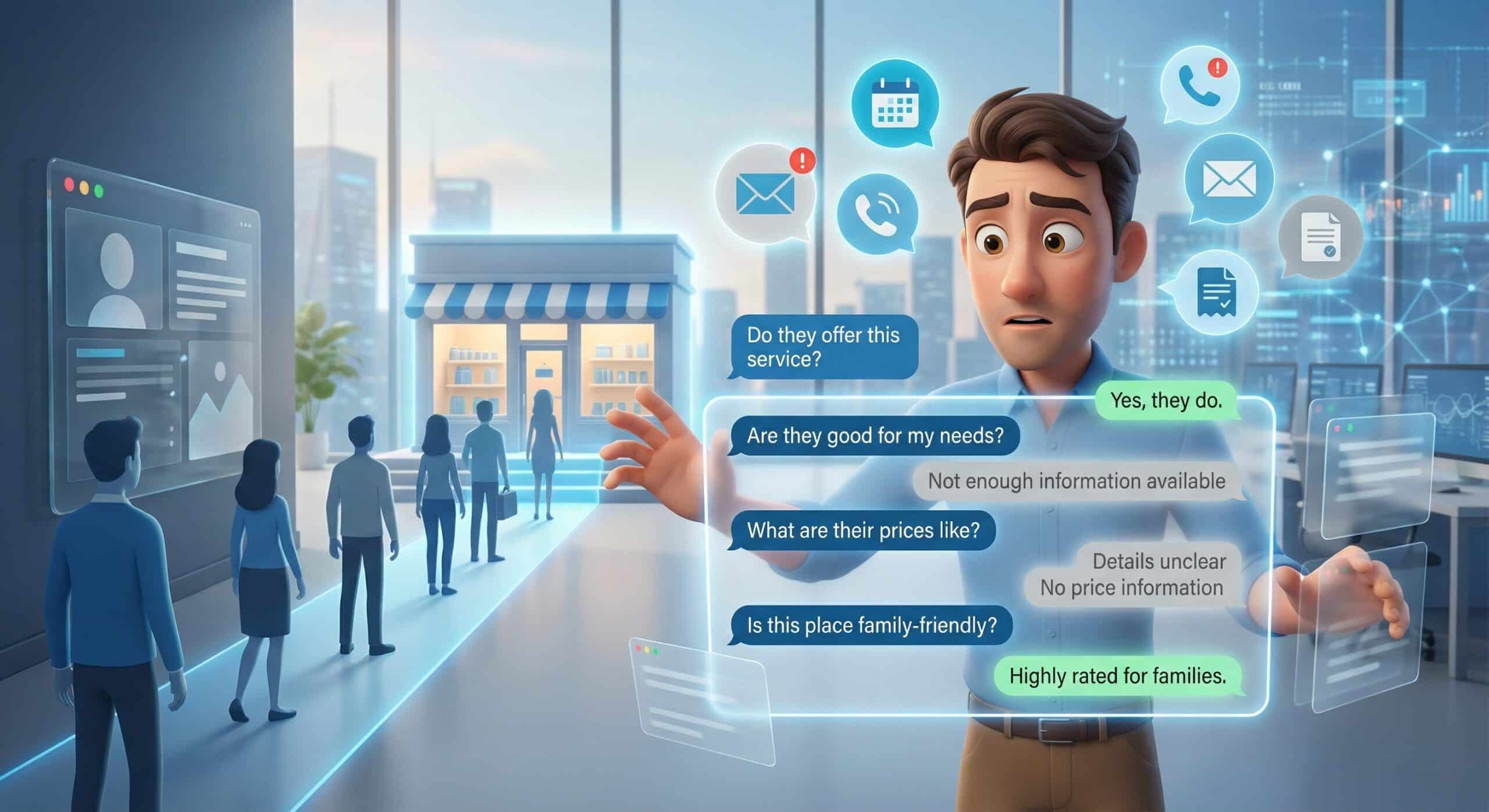
Now? They’re asking Google’s AI direct questions like:
- “Do they offer [specific service]?”
- “Are they good for [specific need]?”
- “What are their prices like?”
- “Is this place family-friendly?”
And here’s the kicker: If your online information isn’t complete and accurate, the AI either gives wrong answers or says “There’s not enough information about this place.”
When that happens, you’re invisible. As a result, the customer moves on to your competitor who has their information sorted out.
How Google’s Ask Maps AI Actually Works
Let’s break this down in plain English.
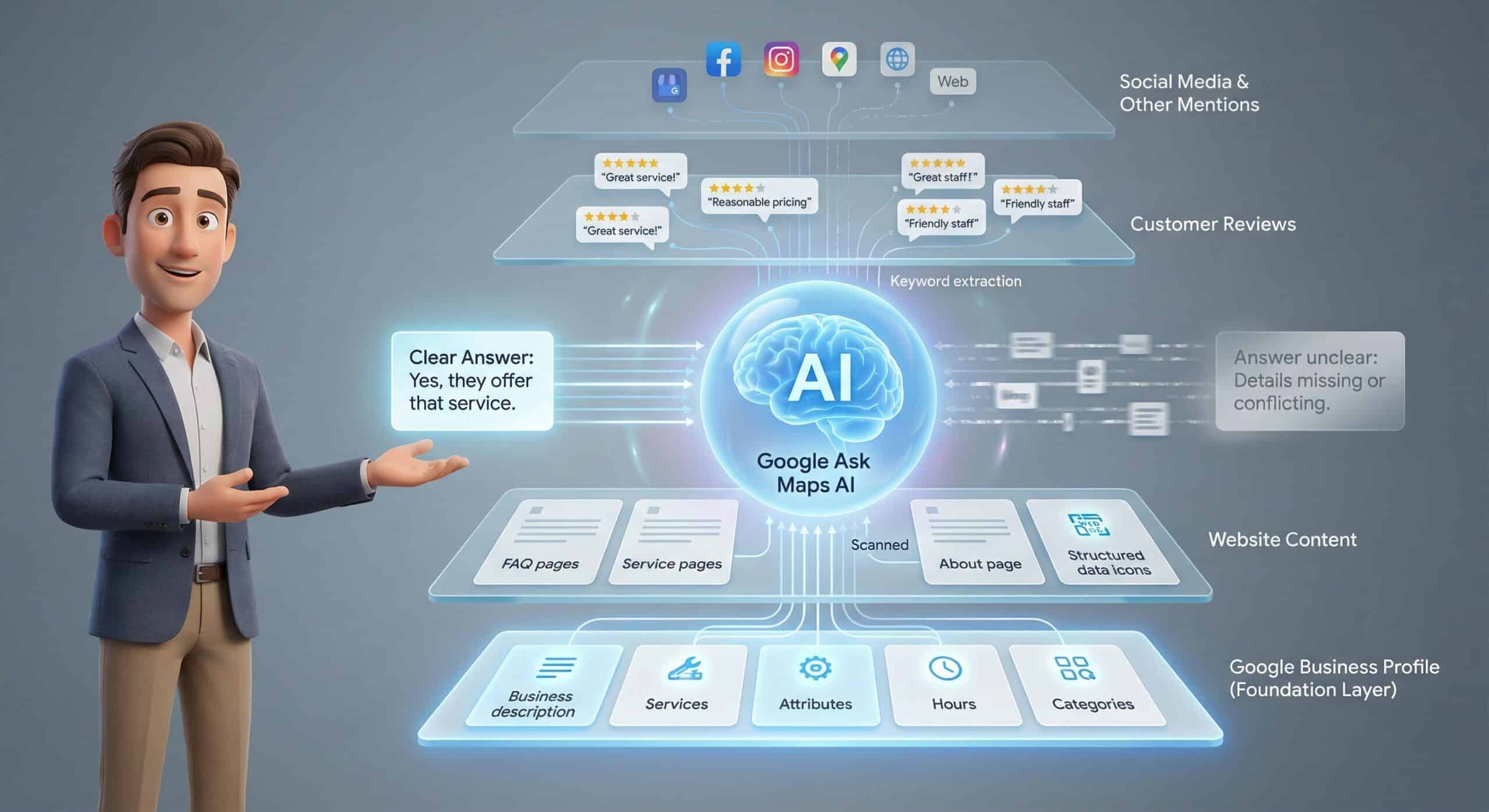
When a potential customer asks a question about your business, Google’s AI doesn’t make things up. Instead, it reads through everything available about your business online. Then, it tries to piece together an accurate answer.
Specifically, the AI looks at your information in this order:
1. Your Google Business Profile First, this is the foundation. Therefore, every field you fill out—business description, services, attributes, hours, categories—feeds the AI’s understanding of what you do.
2. Your Website Next, the AI reads your website like a person would. In particular, it pays special attention to:
- FAQ pages (these are gold for the AI)
- Service descriptions
- About page
- Any structured data you’ve added to help search engines understand your site
3. Customer Reviews Additionally, your reviews aren’t just social proof anymore. Instead, the AI analyzes what customers say about you to understand things like:
- What services you actually provide
- Your price range
- Customer service quality
- Specific features or amenities
4. Your Social Media & Other Online Mentions Finally, if the AI can’t find enough information in the first three places, it starts looking at your Facebook, Instagram, and other online presence.
Here’s the important part: If the information is incomplete, outdated, or inconsistent across these sources, the AI gets confused. Consequently, when AI gets confused, it either gives vague answers or no answer at all.
What This Means for Your Business Right Now
Let’s be honest with you: This change creates both a problem and an opportunity.
The Problem: Most small businesses have incomplete or outdated information online. For example, maybe your Google Business Profile is only 60% complete. Perhaps your website doesn’t have an FAQ page. Additionally, your address might be listed slightly differently across various platforms.
Those small inconsistencies? They used to be annoying. However, now they’re actually costing you leads.
The Opportunity: Fortunately, your competitors are probably in the same boat. Therefore, if you get your online presence organized now, you’ll have a huge advantage.
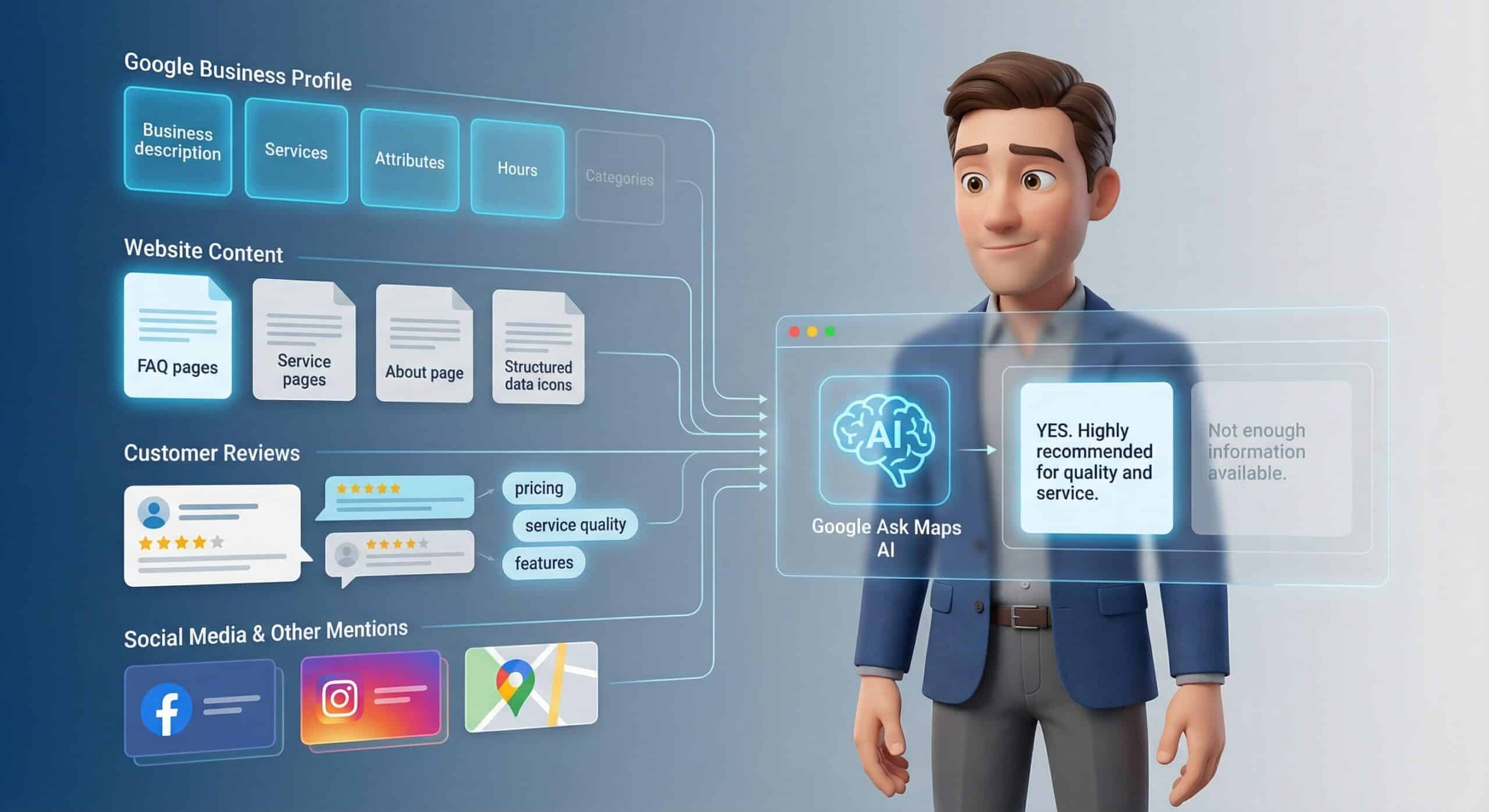
Consequently, when someone asks the AI about businesses in your industry, yours will be the one giving clear, confident answers. Meanwhile, your competitors will be the ones showing “There’s not enough information about this place.”
Why This Feels Overwhelming (And What to Do About It)
If you’re reading this and thinking “I don’t have time to manage all of this,” you’re not alone.
In fact, we hear this from business owners all the time. Specifically, you’re trying to run your business, serve your customers, and somehow also become an expert in Google AI, website setup, review management, and social media consistency.
Honestly, it’s too much.
Here’s the reality: The businesses that thrive in this new AI-powered search world won’t be the ones who understand all the technical stuff. Instead, they’ll be the ones who have systems in place that handle it automatically.
Therefore, that’s where having the right tools and support makes all the difference.
How BusyPros AI Helps You Show Up in AI Search (Without the Overwhelm)
We build our Websites and AI Marketing Tools specifically for this problem.
Our Websites come pre-optimized for AI search:
- Built-in FAQ sections formatted exactly how AI needs to read them
- Automatic schema markup (the technical stuff that helps AI understand your site)
- Mobile-optimized and fast-loading (AI checks this)
- Built-in review management
- AI employees that help you create and update content
Our AI Marketing Tools help you:
- Create consistent, optimized content across all platforms
- Build FAQ pages that AI can understand
- Write review request templates that encourage helpful, detailed reviews
- Keep a consistent brand voice everywhere
Our AI Integration Sessions provide:
- A custom strategy for your specific business
- Help getting your entire online presence organized
- Review generation systems with AI-friendly templates
- 90 days of ongoing support as you set everything up
We’re not trying to make you a technical expert. Instead, we’re giving you the tools and support to stay visible as search moves toward AI.
The Bottom Line
Google’s move to AI-powered answers isn’t going away. In fact, this is the future of how customers find and evaluate local businesses.
The question isn’t whether this affects you. Instead, it’s whether you’re going to adapt or get left behind.
Your competitors with better-optimized online presences are already getting leads while you’re sitting silent. Specifically, when customers ask questions, those businesses are giving clear answers. Meanwhile, you’re showing “There’s not enough information about this place.”
The good news? You don’t need to figure all this out on your own. Furthermore, you need the right systems in place, and you need them now.
Because every day you wait is another day of potential customers choosing someone else.
Frequently Asked Questions About Google Business Profile Q & A’s and AI Search
What happened to the Q&A section on Google Business Profiles?
Google officially removed the Q&A feature in December 2025 and replaced it with “Ask Maps,” an AI-powered tool that automatically generates answers to customer questions using information from your Google Business Profile, website, reviews, and other online sources.
Can I still answer customer questions about my business on Google?
Not in the traditional Q&A format. Instead, you need to make sure your Google Business Profile, website, and other online information is complete and accurate so Google’s AI can generate correct answers automatically.
How does Ask Maps work?
When someone searches for your business and asks a question, Google’s AI (Gemini) analyzes your Google Business Profile, website content, customer reviews, and social media to generate an instant answer. If it can’t find enough reliable information, it displays “There’s not enough information about this place.”
What information does Google's AI use to answer questions about my business?
The AI pulls from multiple sources in this priority order:
- Your Google Business Profile (hours, services, attributes, description, photos)
- Your website content (especially FAQ pages and service descriptions)
- Customer reviews
- Social media profiles
- Online directories and other mentions across the web
Why does my business show "There's not enough information about this place"?
This message appears when Google’s AI can’t find sufficient or reliable information about your business online. It usually means your Google Business Profile is incomplete, your website lacks detailed information, or you don’t have enough customer reviews. This is a serious problem because it makes you invisible to potential customers.
What's the most important thing I can do right now to show up in AI search?
Complete every single field in your Google Business Profile and create a detailed FAQ page on your website. These two actions provide the AI with the most direct, reliable information about your business.
Do I need technical knowledge to optimize for AI search?
No, but you do need to be thorough and consistent. The technical aspects (like schema markup) help, but the foundation is simply having complete, accurate, consistent information everywhere your business appears online.
How long does it take for changes to show up in AI answers?
Google Business Profile updates typically sync within a few hours to 24 hours. Website changes may take a few days to a couple of weeks to be reflected in AI-generated answers, depending on how often Google crawls your site.
Will AI search replace traditional Google search results?
AI-powered features are being added to traditional search, not replacing it entirely. However, AI-generated answers are becoming more prominent, especially for local business searches. The trend is clear: AI will play an increasingly important role in how customers find businesses.
What if I don't have time to manage all of this?
This is the exact problem our Websites and AI Marketing Tools solve. We’ve built systems that handle the technical optimization automatically, so you can focus on running your business while staying visible in AI-powered search.
Can negative reviews hurt how AI represents my business?
Yes. The AI analyzes all reviews – positive and negative – to understand your business. A pattern of negative reviews mentioning specific issues will influence how the AI describes your business. This is why responding professionally to all reviews and actively managing your reputation is more important than ever.
Do I need to hire an SEO expert or agency?
Not necessarily. Many small businesses can handle basic optimization themselves with the right tools and guidance. However, having expert support and automation tools (like what we provide at BusyPros AI) saves time and ensures you don’t miss important optimization opportunities.
How do I know if my online information is consistent across platforms?
Manually search for your business name on Google, check your listings on Facebook, Yelp, Bing Places, and industry directories. Compare your business name, address, and phone number exactly. Even small differences (like “St” vs “Street”) should be corrected to match everywhere.
What's the difference between Google Business Profile and Google My Business?
They’re the same thing. Google rebranded “Google My Business” to “Google Business Profile” in 2021, but many people still use the old name. If you see either term, they’re referring to the same free business listing tool from Google.
Is Ask Maps available everywhere?
Currently, Ask Maps is primarily available in the United States. Google hasn’t announced a specific timeline for international expansion, but the feature is expected to roll out to more countries throughout 2026. However, the underlying need to optimize your online presence applies globally as Google continues moving toward AI-powered search.
Ready to make sure Google’s AI is working for you instead of against you?
Our Websites are built specifically for the AI-powered search era. Schedule a free discovery call to learn how we can help your business show up when customers are searching.
BusyPros AI helps small businesses create marketing that resonates, without the need for complicated tools or larger teams. Our Smart Websites and AI Marketing Tools are designed to help you thrive in the age of AI-powered search.
Schedule Your Free AI Discovery Call →
Tools & More

How to Claim Your Business on ChatGPT
Want to know how to claim your business on ChatGPT?
Start by opening Business Hub in ChatGPT. Search for your business, choose the right listing, and follow the steps to show that you can manage it.
An identity check may also be needed before you can change business details. Not every business will see the same options, and claiming your listing does not guarantee more customers. Here’s what to expect.
What to check before you start
First, take a look at your Google Business Profile and other online listings. Is your business name right? What about your website and contact details? We recommend fixing anything that’s out of date so customers can find the right information.
Keeping your listings current is a good habit, but it won’t guarantee that ChatGPT uses those details or approves your claim.
Next, make sure you have access to the tools you may need. Depending on the options shown, that could be your business phone, email, website domain, or Shopify account. Only the owner or someone with permission can manage the listing.
An identity check may require a government-issued ID, business records, or proof that you can represent the business.
How to claim your business on ChatGPT
Sign in to ChatGPT and open Business Hub from the sidebar.
Search for your business by name. Choose the right listing and confirm the account you want to use.
Pick one of the verification options shown and follow the steps. Depending on your listing, these may include your business phone, email, website domain, or Shopify store.
Complete identity verification through Persona when prompted. OpenAI will review what you submit and may ask for more details.
Once your claim and identity check are approved, return to your profile to review the details you can update.
Want a closer look at the process? Download our founder’s guide.
Which verification option should you choose?
The best choice depends on what you can access. A phone or email code may be convenient if you can receive it at the number or address shown. If you can’t, check whether another option is available.
Website verification may be another option. This involves adding a small piece of text, called a TXT record, to your domain settings. If someone else manages your website domain, you can ask them for help. Changes to those settings can take time to show up.
Our team used the website option to claim multiple businesses about a week ago. We found the steps easy to follow, but we didn’t receive the approval emails we expected. That doesn’t mean the same thing will happen to you. If you’re waiting, check your status in Business Hub and follow the instructions on your screen.
Keep in mind that checking your connection to the business and checking your identity are separate steps. Persona approval is needed before you can update business details, view available insights, or create an eligible business agent.
What if you can’t find your business?
Some eligible online businesses may see an option to add a listing. For now, local stores and restaurants can claim an existing listing in the U.S. Availability can change, so check what appears in your account.
Is the listing locked? Look for a contact support option on the screen. Contact OpenAI Support if a claim fails and there is no option to try again, or if the status still looks wrong after approval.
What happens after you claim your business?
Once your claim and identity check are approved, you can update the business details available in your profile. Business Hub may also show insights about how people find and interact with your business in ChatGPT. A blue check appears after Persona approves your identity check.
Changes may take time to appear. ChatGPT can also use other sources when it answers questions, so a change to your profile may not show up in every answer right away.
Will claiming your business help you get more customers?
Claiming gives you a way to manage the information you provide, but it does not promise a higher spot in ChatGPT or more sales. ChatGPT can compare businesses and make its own recommendations.
Think of the profile as one part of your online presence. Keep your details accurate, and make it easy for people to understand what you offer and how to reach you.
Should you do it yourself or get help?
Doing it yourself is an option when the accounts and details needed for verification are within reach. The benefit is that you stay in control. The trade-off is the time it may take to find logins, update domain settings, or work through a problem.
A teammate or agency you trust can also help. It’s still important to decide who gets access and make sure the business details are correct. Business Hub lets an admin invite teammates and grant agency access, though some account limits may apply. Each person should use their own account.
Frequently asked questions
Do I need to buy ads to claim my business?
No.
Claiming an eligible business does not require buying ads or opening an advertising account.
Do I need a business agent?
No. A business agent is optional. It can answer customer questions using information a business provides, but it has its own eligibility rules. OpenAI currently offers it to eligible U.S. ecommerce and online service businesses with a website.
Does claiming guarantee a recommendation?
No. Claiming does not guarantee that ChatGPT will recommend your business, place it higher, or bring you sales.
What if I don’t get an approval email?
Check your claim and identity status in Business Hub. Our team didn’t receive the emails we expected, but your experience may be different. If you need help, contact OpenAI Support.Your next step
Ready to get started? Download our founder’s guide, then take a few minutes to check your business details before opening Business Hub.
About the author
BusyPros AI’s certified digital marketers and certified AI consultants have 15 years of experience building and ranking websites.